Complete guide: Education Models
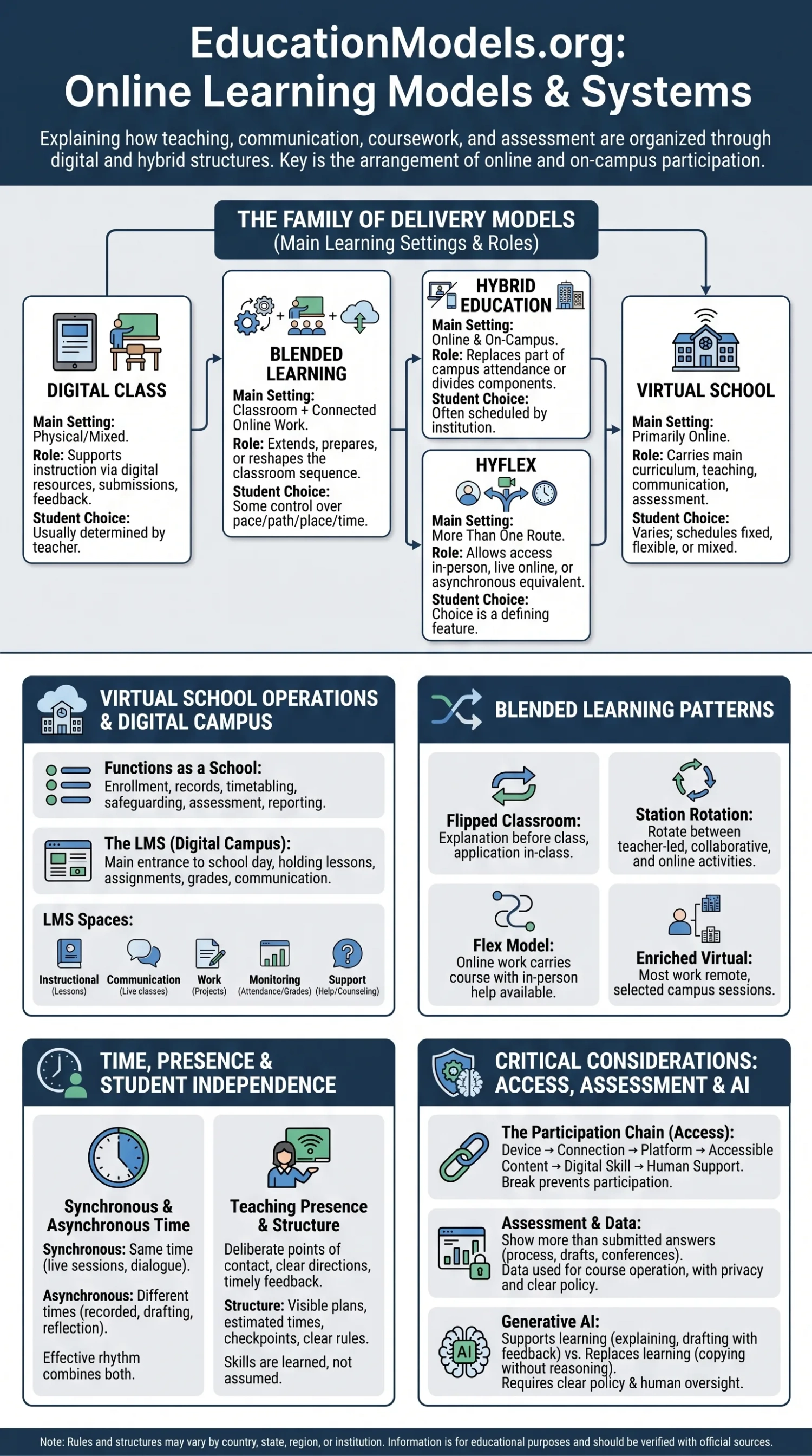
An online learning model describes how teaching, communication, coursework, assessment, and student support are organized when digital systems carry part or all of the learning process. A virtual school delivers most instruction online. A digital class may remain fully campus-based while using online resources. Blended learning connects classroom and online work in one planned sequence. Hybrid education divides participation between online and on-campus settings, while HyFlex gives learners more than one route into the same course. These labels are often used loosely, so the practical questions matter more: where does learning occur, when must students participate, who provides support, and how is progress verified?
Online Learning Is a Family of Delivery Models
The presence of a learning platform, video call, or tablet does not define the model by itself. OECD terminology separates fully online education from hybrid education, blended education, and wider digital education. Fully online provision places instruction online; hybrid provision mixes online and on-campus instruction; blended provision generally keeps in-person teaching as the main setting while adding connected digital activities; digital education covers the wider use of technology to support teaching in any setting.[a]
| Model | Main Learning Setting | Role of Online Activity | Student Choice Over Participation |
|---|---|---|---|
| Virtual school | Primarily online | Carries the main curriculum, teaching, communication, and assessment | Varies by school; schedules may be fixed, flexible, or mixed |
| Digital class | Physical, online, or mixed | Supports instruction through digital resources, submissions, feedback, or simulation | Usually determined by the teacher or institution |
| Blended learning | Classroom plus connected online work | Extends, prepares, or reshapes the classroom learning sequence | Some control over pace, path, place, or time may be built in |
| Hybrid education | Online and on campus | Replaces part of campus attendance or divides course components by setting | May be scheduled by the institution rather than chosen by the learner |
| HyFlex | More than one participation route | Allows access in person, live online, or through an equivalent later route | Choice is a defining feature when the model is fully implemented |
Terminology Changes Across Institutions
A university may use “hybrid” for a course that meets on campus every second week, while a school system may use the same term for rotating student groups. The label should be followed by a plain description of attendance, live-session, workload, assessment, and campus requirements.
A temporary move to video meetings and emailed assignments is also different from a planned online program. Emergency delivery often reproduces a physical timetable through digital tools. Designed online learning begins with the conditions of remote participation and then decides how explanation, practice, interaction, feedback, and support should work. OECD analysis of digital teaching notes that technology use can remain far from the more responsive forms of teaching it could support when pedagogy and tools are poorly aligned.[b]
How a Virtual School Operates as a School
A virtual school is not simply a website containing lessons. It must perform many of the functions handled by a physical school: enrollment, student records, timetabling, teacher assignment, curriculum delivery, attendance monitoring, safeguarding, assessment, reporting, technical support, and communication with families. The legal status may be public, private, independent, or connected to a larger school system. Recognition, funding, teacher licensing, and diploma rules depend on the jurisdiction.
The Digital Campus
Most virtual schools use a learning management system, often shortened to LMS, as the main entrance to the school day. The LMS may hold lesson modules, calendars, assignments, grades, discussion spaces, teacher announcements, and progress records. Live-class software, messaging tools, student information systems, digital libraries, identity services, and assessment platforms may sit beside it. A well-organized program makes these systems feel connected rather than forcing students to search across unrelated accounts.
- Instructional space: lessons, readings, demonstrations, simulations, and recorded explanations.
- Communication space: live classes, teacher messages, group discussions, office hours, and family contact.
- Work space: assignments, projects, drafts, peer review, and portfolios.
- Monitoring space: attendance signals, completion records, feedback, grades, and intervention alerts.
- Support space: orientation, technical help, counseling, accessibility services, and academic assistance.
The Student Day Is Usually Structured, Even When It Is Flexible
A student may begin by checking weekly goals, join a live mathematics lesson, complete a self-paced science module, meet a small project group, submit a written response, and attend a short teacher conference. Another program may organize work around daily live lessons. Flexibility may apply to the hour, the order of tasks, the pace of a unit, or the place of study. It does not necessarily mean that deadlines, attendance duties, or teacher contact disappear.
The distinction between a full-time virtual school and an online course provider also matters. A full-time school may take responsibility for the whole student record and award the final qualification where authorized. A course provider may supply only one subject, an advanced class unavailable locally, credit recovery, or a short specialist program. Families and students need to know which institution holds responsibility for enrollment, credit, assessment, and certification.
Digital Classes Do Not Automatically Become Hybrid Classes
A physical classroom can use digital textbooks, interactive boards, adaptive practice, online quizzes, shared documents, virtual laboratories, and an LMS while remaining an in-person class. In this case, technology changes the materials or workflow, not the place of attendance. The same distinction applies online: placing scanned worksheets on a platform does not create a new teaching model if the learning sequence itself remains unchanged.
Technology Use and Delivery Model Are Separate Decisions
A tablet is a device. An LMS is an organizational system. A recorded lecture is a resource. Blended, hybrid, and HyFlex describe how these elements are arranged around teaching and participation.
Digital classes can still alter teaching in useful ways. A teacher may see misconceptions before a lesson, assign different practice sets, let students replay a demonstration, or use a simulation that would be difficult to reproduce in the room. The educational value comes from what the tool enables and how the teacher uses the information it produces.
Blended Learning Connects Online and Classroom Work
Blended learning places online and supervised in-person learning on one connected path. The U.S. Common Education Data Standards description includes student control over some aspect of time, place, path, or pace and states that the different modes should form an integrated learning experience.[c] This connection is what separates blended design from a classroom course with extra digital homework.
A blended sequence might begin with a short online explanation and a diagnostic task. The teacher reviews the responses before class. Campus time is then used for discussion, guided practice, laboratory work, or problem solving. Afterward, students receive different follow-up activities based on what they understood. The online and classroom portions have different purposes, but each depends on the other.
| Blended Pattern | How Time and Place Are Organized | What the Teacher Must Coordinate |
|---|---|---|
| Flipped classroom | Initial explanation or preparation occurs before the classroom session | Pre-class access, accountability, and meaningful in-class application |
| Station rotation | Students rotate among teacher-led, collaborative, and online activities | Group timing, task difficulty, movement, and evidence from each station |
| Flex model | Online work carries much of the course while in-person help is available | Progress monitoring and timely small-group or individual intervention |
| Enriched virtual pattern | Students complete most work remotely and attend selected campus sessions | Clear reasons for attendance and continuity between remote and campus work |
Weak blending usually produces duplication. Students watch a long lecture online, hear the same explanation in class, and then receive digital tasks in addition to the existing workload. Other problems appear when teachers use too many platforms, when online work receives no feedback, or when students who miss the preparation cannot participate in the classroom task. Blended learning needs one coherent workload, not two parallel courses.
Hybrid and HyFlex Education Change the Route Into the Course
Hybrid education replaces part of campus participation with online participation. The split may occur by week, student group, subject, or course component. A program can place theory online and laboratory work on campus. It can schedule one group in the classroom while another studies remotely. A university course may meet in person several times during a term and complete the remaining work online.
Simultaneous hybrid teaching is harder than streaming a classroom. The teacher has to notice remote learners, make room audio intelligible, share visual materials in an accessible form, manage questions from two spaces, and design group work that does not leave online students as observers. Camera placement, microphones, chat moderation, room acoustics, and a backup plan become part of lesson design.
HyFlex adds a stronger element of learner choice. A student may attend on campus, join live online, or use an equivalent asynchronous route. A course reaches this standard only when each route can lead to the same learning outcomes. A classroom camera and a recording archive do not provide equivalent participation if remote learners cannot ask questions, collaborate, access materials, or complete suitable assessments.
Check the Attendance Rules Behind the Label
Some programs described as flexible still require fixed live sessions, examinations at an approved site, laboratory attendance, placements, performances, or identity checks. These conditions should be confirmed before enrollment.
Synchronous and Asynchronous Time Shape the Learning Week
Synchronous learning brings teachers and students together at the same time. Asynchronous learning allows participation at different times through recorded explanations, readings, discussions, practice, projects, and feedback. The U.S. National Center for Education Statistics defines distance education around separation between learner and instructor while allowing regular interaction to occur synchronously or asynchronously.[d]
Live sessions are suited to dialogue, demonstration, oral practice, immediate feedback, and community routines. Asynchronous time is suited to close reading, drafting, reflection, repeated practice, and participation across different schedules or time zones. Neither mode is automatically more demanding or more flexible. A recorded lecture with a fixed viewing window can be less flexible than a live session offered more than once.
An effective weekly rhythm usually combines explanation, independent work, teacher response, peer exchange, and tasks away from the screen. The balance changes by age and subject. Early learners often need shorter activities and closer adult support. Language learning may need frequent live interaction. A mathematics course may combine independent practice with scheduled problem-solving clinics. Art, science, technical, and vocational subjects may need physical materials, studio work, laboratories, workshops, or supervised placements.
Teaching Presence Replaces the Physical Hallway
In a physical school, students can ask a question after class, read a teacher’s reaction, or be noticed when work begins to slip. Online programs must recreate these points of contact deliberately. Teaching presence appears through clear weekly directions, useful announcements, visible office hours, personal feedback, active discussion, timely responses, and outreach before a student disappears from the course.
The teacher’s work can expand rather than shrink. Online teachers organize materials, teach live sessions, respond in several channels, monitor activity patterns, create accessible alternatives, moderate collaboration, verify learning, and decide when automated feedback is insufficient. They also need to separate a technical problem from an academic problem. A missed task may reflect confusion, weak planning, unreliable internet, inaccessible content, or a family schedule rather than lack of effort.
Automation can return a score. It cannot by itself determine why a learner is stuck, what explanation will help, or when personal contact is needed.
Student Independence Still Needs Structure
Online study asks students to manage time, interpret written instructions, track deadlines, choose when to seek help, and recover after distraction. These skills are learned. A program should not treat them as entry requirements that every student already possesses.
Structure can include a visible weekly plan, estimated task times, reminders, short progress meetings, staged deadlines, and clear rules for late or missing work. Younger students may need a family member or other adult to serve as a learning coach by helping with routines, materials, and communication. That adult should not be expected to replace the teacher or deliver the curriculum.
Older students may benefit from wider control over pace and order, yet they still need predictable contact and clear evidence of progress. Flexibility works best when boundaries are visible. An open calendar with no intermediate checkpoints can allow a small delay to become a large backlog.
Attendance, Engagement, and Progress Are Different Signals
A login confirms access to a system. It does not confirm attention, understanding, or completed learning. Online programs can observe several signals: entry into the course, time spent on a task, contribution to discussion, assignment submission, teacher contact, revision after feedback, and movement toward course outcomes. Each signal answers a different question.
| Signal | What It Shows | What It Does Not Prove |
|---|---|---|
| Activity | The learner entered or used the digital environment | That the learner understood the material |
| Participation | The learner joined an assigned interaction or task | That the contribution reflects independent work |
| Engagement | The learner sustained effort, responded, revised, or sought help | That the expected learning outcome has been reached |
| Progress | Work and assessment show movement toward stated outcomes | That access, wellbeing, and motivation no longer need support |
Attendance policy should therefore match the model. A school may need daily contact, weekly academic progress, completion of a required number of activities, or participation in scheduled sessions. The rule should be explained in plain language, especially when attendance affects credit, funding, eligibility, or progression.
Assessment Must Show More Than a Submitted Answer
Online assessment can include short quizzes, open responses, oral conferences, projects, portfolios, live demonstrations, simulations, peer review, learning journals, and examinations under supervision. Digital systems can also record process information, such as revisions, response paths, or the order in which a task was attempted. OECD work on digital assessment notes that technology can support new assessment practices, while implementation still has to address the limits and challenges of digital administration.[e]
The assessment form should match the outcome. A multiple-choice test may check recognition or calculation. It is a weaker choice for evaluating an extended argument, a laboratory procedure, collaborative planning, oral fluency, or creative production. Strong online courses use several forms of evidence rather than treating one proctored examination as the only trustworthy measure.
Academic integrity is easier to manage when tasks require explanation, application, drafts, sources, personal reflection, and discussion of the work. Identity checks and remote proctoring may be used in some programs, but they raise questions about privacy, equipment, room scanning, disability accommodations, and technical failure. Students should know what data are collected, what behavior is flagged, how decisions are reviewed, and what alternative arrangement exists when the system is unsuitable.
Access Depends on the Entire Participation Chain
Owning a device is only one part of digital access. The learner also needs dependable connectivity, sufficient data, suitable software, a usable study space, accessible course design, technical help, and enough digital skill to move between systems. Shared household devices can create timetable conflicts. Mobile-only access may allow messaging and reading but make long writing, data analysis, design work, or specialist software difficult.
Global school connectivity remains uneven. UNESCO reported that 40% of primary schools, 50% of lower secondary schools, and 65% of upper secondary schools had internet access, with large differences between regions and especially low access in some rural settings.[f] These figures show why a model that works in a connected urban institution cannot be transferred unchanged to every community.
The Participation Chain
Device → connection → platform → accessible content → digital skill → human support. A break at any point can prevent a formally enrolled student from participating fully.
Offline downloads, printable alternatives, low-bandwidth versions, recorded sessions, device-loan programs, campus access points, telephone support, and flexible deadlines can reduce barriers. These measures should be part of the program design rather than improvised after students begin missing work.
Accessible Design Has to Begin Before the Course Starts
Digital delivery can remove travel and scheduling barriers, but it can also create new obstacles. Video without accurate captions excludes some learners. Scanned image files may not work with screen readers. Timed interfaces can disadvantage students who need more processing time. Drag-and-drop tasks may be unusable without a mouse. Dense pages, unclear headings, distracting motion, and inconsistent navigation increase cognitive effort.
Universal Design for Learning encourages course designers to provide more than one way to engage with learning, encounter information, and demonstrate understanding. CAST’s current UDL Guidelines describe design choices intended to support access, participation, collaboration, feedback, and learner agency across settings.[g]
Technical accessibility also needs testable standards. WCAG 2.2 covers areas such as text alternatives, captions, keyboard access, focus visibility, headings, contrast, error identification, and predictable interaction.[h] Meeting a technical requirement does not guarantee good teaching, but inaccessible technology can block teaching before it reaches the learner.
- Provide accurate captions and transcripts for instructional audio and video.
- Use headings, labels, and navigation that remain consistent across modules.
- Make core functions available by keyboard and compatible with assistive technology.
- Offer readable documents rather than image-only pages.
- Allow suitable alternatives when a task depends on speech, movement, vision, hearing, or fine motor control.
- Test accessibility with real users and not only automated checkers.
Social Learning Needs Deliberate Spaces
Physical proximity does not guarantee belonging, and online contact does not guarantee isolation. Social experience depends on how often students work with others, whether interaction has a purpose, and whether relationships continue beyond one assignment. Live discussions, small groups, clubs, mentoring, student councils, local meetings, shared projects, performances, and peer-support spaces can all contribute.
Online participation can also become passive. Students may enter a live room with little opportunity to speak. A small group may divide work without real collaboration. Camera requirements can create privacy or access problems. Unmoderated messaging can lead to exclusion or harmful behavior. Schools need clear conduct rules, reporting routes, active moderation, and activities that give each learner a meaningful role.
Practical subjects need a separate social and physical plan. Science laboratories, clinical training, technical workshops, fieldwork, art studios, music ensembles, and work placements may require approved local partners or scheduled campus sessions. A model should explain how these experiences are provided rather than assuming that every outcome can be moved onto a screen.
Learning Data Creates New Responsibilities
Digital systems can record login times, clicks, pages viewed, video activity, messages, drafts, assessment responses, device information, and patterns of participation. These records may help a teacher notice a student who is falling behind, but they can also produce misleading interpretations. A long time on a page may show careful reading, distraction, an accessibility barrier, or an open browser tab.
OECD guidance on education data governance links useful data use with privacy, data protection, clear policy, trained staff, and responsible sharing.[i] Schools and providers should collect only what they need, state why it is collected, control access, define retention periods, secure accounts, and explain how automated alerts or predictions affect students.
- Which platform records the data, and who owns or controls the record?
- Can teachers, administrators, vendors, or other institutions view it?
- Is the data used only to operate the course, or also for product development and analytics?
- How can a student correct an inaccurate record or challenge an automated decision?
- What happens to the data after the course or enrollment ends?
Generative AI Is Now Part of the Online Learning Environment
Generative AI can explain a concept in another way, create practice questions, support language work, comment on a draft, simulate a conversation, or help a teacher produce alternate versions of material. It can also invent facts, hide weak reasoning behind fluent prose, reproduce bias, expose personal data, and complete work that the student was meant to do.
The OECD Digital Education Outlook 2026 reports that generative AI can support learning when its use is guided by clear teaching principles. It also notes that these tools are widely available outside institutional control, which means that rules based only on blocking access are unlikely to describe actual student behavior.[j]
| AI Supports Learning When the Student… | AI Replaces Learning When the Student… |
|---|---|
| Requests another explanation and checks it against course sources | Accepts generated claims without verification |
| Uses feedback to revise an original draft | Submits generated writing as personal work |
| Practices questions and explains why an answer is correct | Copies answers without showing reasoning |
| Uses the tool under stated course rules | Conceals use where disclosure is required |
| Removes personal or protected information | Uploads student records, private messages, or identifiable work without permission |
UNESCO’s guidance for generative AI in education calls for data privacy, age-appropriate use, human oversight, and educational validation.[k] A clear school policy should explain permitted uses, disclosure expectations, source checking, data restrictions, teacher responsibilities, and what evidence students must provide to show their own learning.
Assessment design also has to change. A ban statement added to an unchanged take-home task may be difficult to enforce. Oral follow-up, staged drafts, process notes, local examples, source annotations, live application, and reflection on revisions can provide stronger evidence of authorship and understanding.
What Makes an Online Program Credible
Program quality cannot be judged from claims such as “personalized,” “AI-powered,” “global,” or “learn anywhere.” A credible provider explains what students do each week, how teachers interact, how quickly help is available, how work is assessed, what attendance means, and which institution recognizes the result.
| Area to Verify | Evidence to Look For | Warning Sign |
|---|---|---|
| Recognition | Named authority, accreditor, awarding body, or receiving institution that can be checked directly | Vague claims that a certificate is accepted “everywhere” |
| Teacher access | Defined contact methods, response expectations, live support, and teacher qualifications where relevant | Learning appears to depend almost entirely on automated content |
| Course design | Clear relationship among lessons, practice, interaction, feedback, and assessment | A library of videos and quizzes is presented as a complete school experience |
| Student support | Orientation, technical help, academic intervention, counseling, and accessibility procedures | Students are expected to solve access and planning problems alone |
| Attendance and workload | Plain rules for live sessions, deadlines, campus duties, pacing, and estimated study time | “Flexible” is used without explaining fixed obligations |
| Assessment | Several forms of evidence, identity procedures, review routes, and accommodations | One opaque automated score controls progression |
| Data practice | Readable privacy terms, limited collection, access controls, retention rules, and vendor disclosure | Student data use is unclear or broader than course delivery requires |
Recognition must be checked in the relevant jurisdiction. A school may be authorized to operate but not authorized to award the qualification a student expects. A course may transfer to one institution and not another. Professional, laboratory, clinical, and regulated programs may carry extra placement or licensing conditions.
This site is an independent informational guide and is not affiliated with any ministry of education, school authority, exam board, university, government agency, or official ranking organization. Rules for enrollment, attendance, credit, qualifications, transfers, and admission can change. Decisions should be checked with the responsible school, awarding body, education authority, university, or other authorized source.
Choosing the Model by Learning Conditions
The most suitable model depends on the learner, the subject, available support, and the reason for studying online. A student seeking one unavailable course has a different need from a child enrolling in a full-time virtual school. An adult balancing employment may value asynchronous access. A laboratory program may need a hybrid structure. A learner who travels may need predictable remote access but may not be able to attend fixed live sessions.
| Learning Condition | Model That May Fit | Design Requirement |
|---|---|---|
| Most learning must occur away from campus | Virtual school or fully online course | Strong teaching presence, support, identity procedures, and a complete remote curriculum |
| Campus learning remains central but online work should prepare or extend it | Blended learning | One connected sequence and a workload that does not duplicate tasks |
| Theory can occur online while practical work needs facilities | Hybrid education | Clear division of outcomes, schedules, equipment, and campus requirements |
| Learners need to change participation mode | HyFlex | Equivalent access to interaction, materials, support, and assessment across routes |
| Technology should improve an otherwise in-person lesson | Digital class | Tools chosen for a defined teaching purpose rather than novelty |
Some learners value control over pace and study location. Others need the routine, immediate contact, equipment, or social density of a physical campus. These preferences are not fixed traits. A student may thrive online in one subject and need face-to-face support in another. Program design, teacher contact, family circumstances, disability access, language support, and internet reliability can change the result.
Quality Depends on the Whole Learning System
The strongest online learning model is not the one with the most software or the greatest amount of screen time. It is the one in which teaching, timing, interaction, assessment, accessibility, technical systems, and human support point toward the same learning outcomes.
A virtual school needs school-level responsibilities, not only digital lessons. A blended course needs meaningful connections between online and classroom work. A hybrid program needs a clear reason for placing each activity where it occurs. HyFlex needs more than attendance choice; each route must allow real participation. Once these conditions are visible, the label becomes easier to interpret and the student experience becomes easier to evaluate.
Sources and Verification
- [a] Enabling standards, supports and practices for high-quality digital higher education in Croatia — Supports the distinctions among fully online, hybrid, blended, and wider digital education. (OECD.)
- [b] Pedagogical approaches, curricula and assessments for high-quality digital education — Supports the discussion of alignment between digital tools and teaching practice. (OECD.)
- [c] CEDS Addresses Virtual and Blended Learning — Provides the formal blended-learning description and model categories used in U.S. education data standards. (U.S. Department of Education initiative.)
- [d] Fast Facts: Distance learning — Defines distance education and synchronous or asynchronous interaction in the U.S. postsecondary statistical context. (National Center for Education Statistics.)
- [e] Digital assessment: OECD Digital Education Outlook 2023 — Supports the discussion of digital assessment opportunities and implementation limits. (OECD.)
- [f] What you need to know about AI and the right to education — Provides the global school-connectivity figures and regional access context. (UNESCO.)
- [g] CAST Universal Design for Learning Guidelines — Supports the course-design discussion on access, participation, feedback, and learner agency. (CAST.)
- [h] Web Content Accessibility Guidelines (WCAG) 2.2 — Provides the international technical standard for accessible web content and interaction. (World Wide Web Consortium.)
- [i] Data and technology governance: fostering trust in the use of data — Supports the discussion of privacy, protection, policy, staffing, and responsible education-data use. (OECD.)
- [j] OECD Digital Education Outlook 2026 — Supports the discussion of teaching-led generative AI use and access outside institutional control. (OECD.)
- [k] Guidance for generative AI in education and research — Supports the points on privacy, age-appropriate use, human oversight, and educational validation. (UNESCO.)
Related Topics
- → Private Education Model: Schools, Fees, Curriculum, and Access
- → Traditional Education Model: Structure, Strengths, and Limitations
- → Project-Based Learning: How This Education Model Works
- → Waldorf Education Model: Philosophy, Schools, and Learning Approach
- → Montessori Education Model: How It Works and Who It Is For
- → IB Education Model: Curriculum, Exams, and Global Recognition